
LCX Exchange
Comprar criptoMercadosOperar
Productos
Trading con IA
Opera cripto con asistentes de IA
NUEVO
Tokenización
Marco de activos del mundo real
Liberty Chain
Tokenización institucional
Venta de tokens
Descubre los nuevos lanzamientos de tokens
Centro de recompensas
Gane incentivos digitales
¿Por qué LCX?
Acerca de
Su criptopuerta de confianza
Token de LCX
Token de utilidad para el comercio sin fisuras
Socios
Red de colaboradores de confianza
Más
CARACTERÍSTICAS
VIP
Ventajas Premium para los mejores usuarios
Informe de impacto sobre la sostenibilidad
Métricas de la huella de carbono de los tokens
Afiliado
Asociarse y beneficiarse juntos
Competición de trading
Compita por premios exclusivos
PROMOCIONES
Recomendación
Recomienda a tus amigos en LCX
Información sobre el token
Detalles, precio y utilidad
Campaigns
Promociones y eventos actuales
Información
Noticias y anuncios
RECURSOS
Noticias Crypto
Market news & analysis
Documentación de la API
Documentación de referencia
Preguntas frecuentes y asistencia
Resolver consultas de forma rápida y sencilla
Tutoriales
Aprenda paso a paso
DEFI Y SOCIO DE TOKENIZACIÓN
Toto Finance
Tokenizing Real-World Assets
MasterDEX
Intercambio descentralizado
Iniciar sesión
Registrarse
vip-icon
Club VIP
Iniciar sesión
InformaciónLearning Center

How to Place Limit Order on Uniswap Using LCX?

por LCX Team · March 5, 2021 · Updated February 6, 2023

LCX DeFi Terminal built on Uniswap V2 allows its users to place Limit Orders on Uniswap without getting involved in complex processes. 

In general LCX DeFi Terminal is free of charge, but we require that you hold at least 10,000 $LCX Token in your connected wallet. More about fees at LCX.

You can place a Limit Order on Uniswap V2 using LCX DeFi Terminal by following these simple steps. 

To begin with the steps:

Go to https://defi.lcx.com/ 
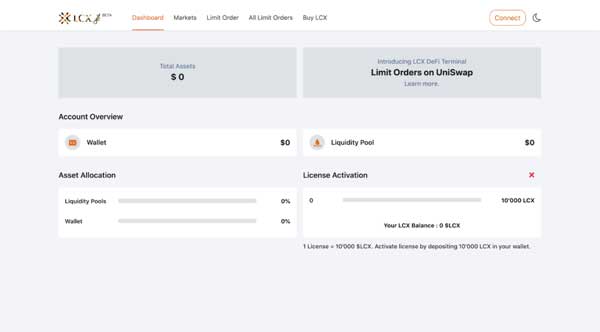
Click on Metamask tab and connect your wallet.
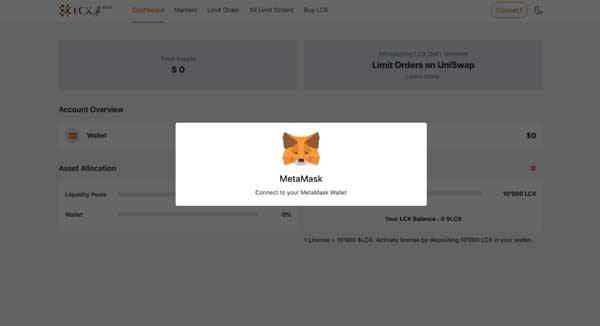
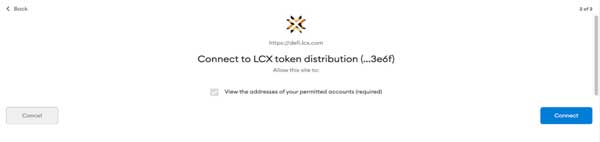
Accept the request to connect your Metamask wallet.
Once it’s connected, the wallet address will appear on the top right corner.

To place a Limit Order, click on the Limit Order Tab on the top of the screen.
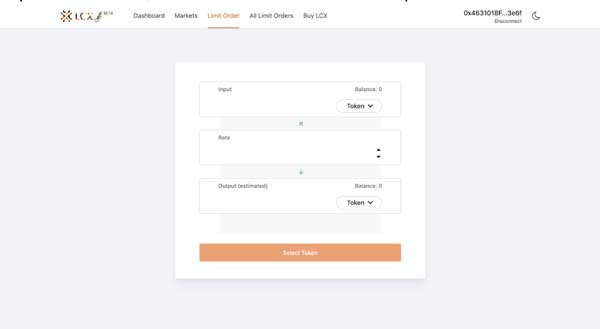
Now select the pair by clicking on the drop-down menu in the Input and Output sections. The token selected in the Input section will be converted for the token in the Output section.
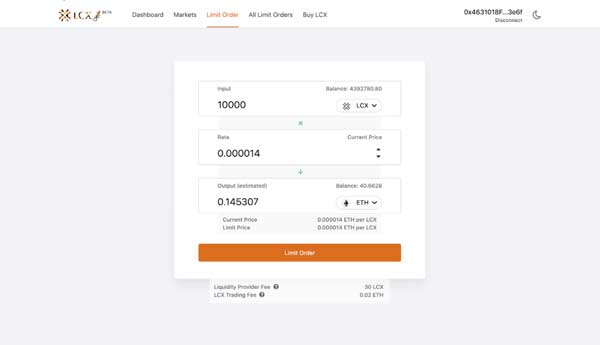
Now enter the limit price in the Rate section. You can see the current price of the token below the output section.
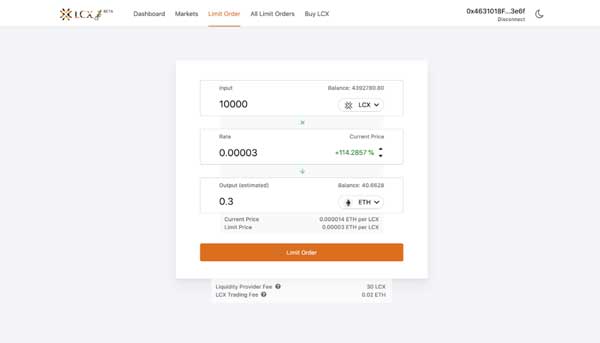
Note on Fees: Only for your successful trade, a fee of 0.3% will be deducted by Uniswap platform for the liquidity platform. Furthermore a fee of 0.02 ETH will be charged by the LCX. You can see the exact amount of fees that will be deducted on the completion of the trade below. 

After clicking Limit Order, the user has to approve the transaction in metamask.

Now click on the Limit Order tab to place the order. 
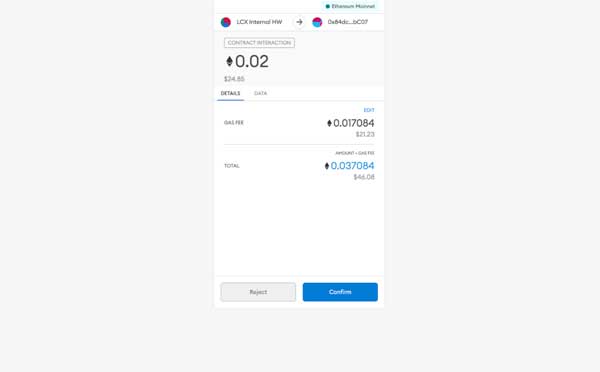
A new window will open with the Transaction Details. A pop up message will appear confirming the placement of your Limit Order.
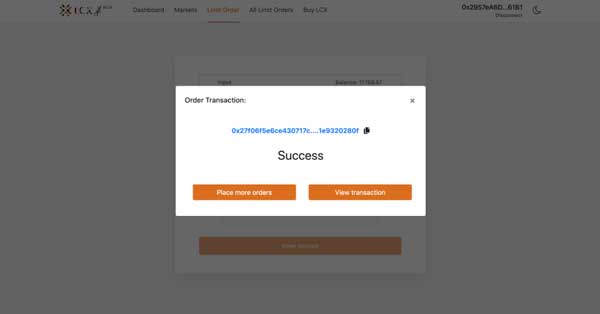
Click on the All Limit Orders tab to view all the trades. Under the Open Trades section, you’ll see a list of all the trades that are still pending, and under the Trade History section, you’ll see a list of all the closed and canceled trades.
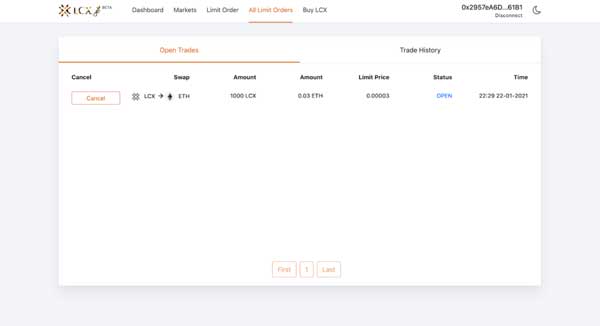
If you intend to cancel a limit order then open the Open Trades section under All Limit Orders and go to the limit order you need to cancel.

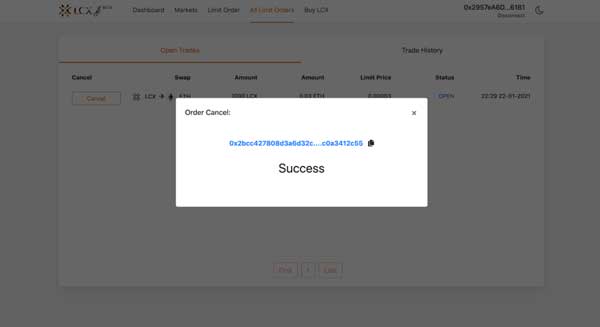
Click on cancel tab next to the limit order. A pop-up message will appear confirming the cancelation and the limit order will be moved to the Trade History section.
LCX DeFi Terminal is a trading dashboard built on top of Uniswap Decentralized Exchange (DEX). Get started at DeFi.LCX.com

Live

Operar en LCX

El exchange de cripto enfocado en cumplimiento normativo de Europa, diseñado para profesionales.

  • ✓Seguridad de nivel institucional
  • ✓Tokenización de activos del mundo real
Empezar a operar
Más de Insights
Announcements
Building American DeFi: MasterDEX Acquired by LCX
July 15, 2026
Announcements
The Next Chapter Is Here – LCX Liberty. American DeFi.
July 13, 2026
Learning Center
Decentralized Identity (SSI) 101: The End of Passwords and Centralized Logins?
July 6, 2026
Learning Center
What Is a Crypto Market Cycle? Bull and Bear Phases Explained
July 3, 2026
Learning Center
What Are Maker and Taker Fees?
June 29, 2026
LCX
Pregunta a la IA sobre LCX
ChatGPTClaudePerplexity

Más sobre LCX

  • Sobre nosotros
  • Empleo
  • Contacte con nosotros
  • Información
  • Crypto Prices
  • Cadena Liberty
  • Programa de recompensas LCX

Productos

  • Token de LCX
  • LCX Ganar
  • Solicitar listado
  • Solicitar la venta de tokens
  • Formulario de comentarios
  • Complaint Form

Legal

  • Comisiones
  • Documentos
  • Marcas y marcas comerciales
  • Política de privacidad
  • Condiciones de servicio
  • Licencias y pie de imprenta
  • MiCA Docs
  • Advertencia de riesgo de criptoactivos
  • Confianza y Transparencia

Guías de compra

  • Comprar BTC
  • Comprar ETH
  • Comprar XRP
  • Comprar SOL
  • Comprar ADA
  • All Buying Guides >>
  • Crypto Prices >>

Asistencia

  • Preguntas frecuentes y asistencia
  • Centro de soporte

Contacto

hello@lcx.com

LCX AG
Herrengasse 6
9490 Vaduz
Liechtenstein

Operar con LCX

Escanear para descargar la aplicación LCX

LCX AG, Herrengasse 6, 9490 Vaduz, Liechtenstein, commercial register FL-0002.580.678-2. LCX AG has applied for authorisation as a crypto-asset service provider under MiCA (EU 2023/1114); the application is under review by the Financial Market Authority (FMA) Liechtenstein. LCX AG is not currently authorised under MiCA. LCX does not offer crypto-asset services to persons in the EEA pending authorisation; existing EEA clients are limited to withdrawals during the wind-down (see MiCA Notice). Crypto-assets involve significant risks, including total loss. LCX does not provide services to persons in the United Kingdom or the United States (Aviso de jurisdicción).

LCX AG © 2018 - 2026. All Rights Reserved

Telegram
X (Twitter)
Instagram
LinkedIn
YouTube
Facebook