
LCX Exchange
Compra cryptoMercatoTrade
Prodotti
Trading IA
Fai trading di cripto con assistenti IA
NUOVO
Tokenizzazione
Quadro degli asset del mondo reale
Liberty Chain
Tokenizzazione istituzionale
Vendita di token
Scopri i nuovi lanci di token
Centro ricompense
Guadagnare incentivi digitali
Perché LCX?
Di
Il suo gateway di fiducia per le criptovalute
Gettone LCX
Token di utilità per un trading senza interruzioni
I partner
Rete di collaboratori fidati
Di più
CARATTERISTICHE
VIP
Vantaggi premium per gli utenti top
Rapporto sull'impatto della sostenibilità
Metriche dell'impronta di carbonio dei token
Affiliato
Partner e profitto insieme
Competizione di trading
Concorrere per premi esclusivi
PROMOZIONI
Riferimento
Invita amici su LCX
Informazioni sul token
Dettagli, prezzo e utilità
Campaigns
Promozioni ed eventi in corso
Approfondimenti
Notizie e annunci
RISORSE
Notizie Crypto
Market news & analysis
Documentazione API
Documentazione di riferimento
FAQ e supporto
Risolvi le tue domande in modo rapido e semplice
Esercitazioni
Impara passo dopo passo
PARTNER DI DEFI & TOKENIZATION
Toto Finance
Tokenizing Real-World Assets
MaestroDEX
Borsa decentralizzata
Login
Iscrizione
vip-icon
Club VIP
Login
ApprofondimentiLearning Center

How to Place Limit Order on Uniswap Using LCX?

di LCX Team · March 5, 2021 · Updated February 6, 2023

LCX DeFi Terminal built on Uniswap V2 allows its users to place Limit Orders on Uniswap without getting involved in complex processes. 

In general LCX DeFi Terminal is free of charge, but we require that you hold at least 10,000 $LCX Token in your connected wallet. More about fees at LCX.

You can place a Limit Order on Uniswap V2 using LCX DeFi Terminal by following these simple steps. 

To begin with the steps:

Go to https://defi.lcx.com/ 
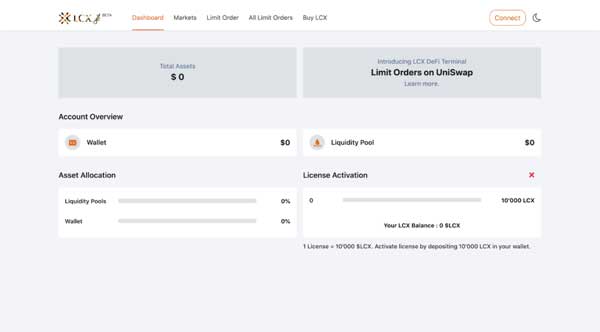
Click on Metamask tab and connect your wallet.
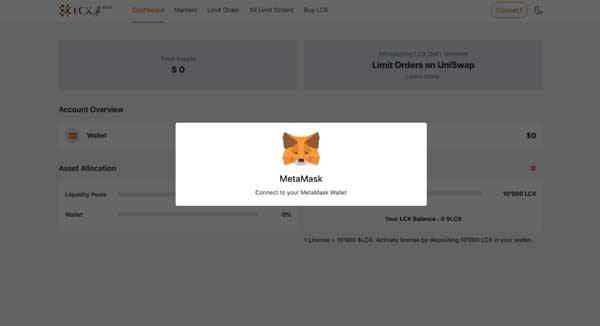
Accept the request to connect your Metamask wallet.
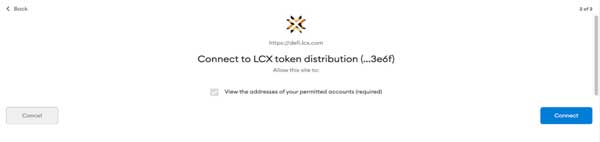
Once it’s connected, the wallet address will appear on the top right corner.

To place a Limit Order, click on the Limit Order Tab on the top of the screen.
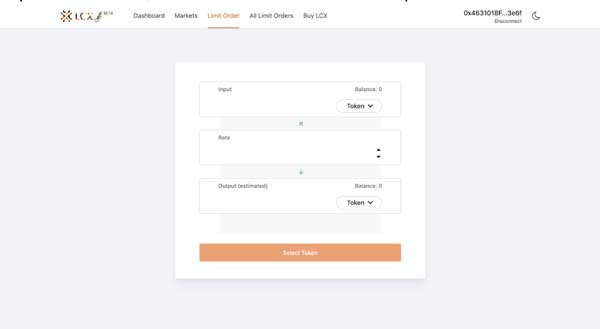
Now select the pair by clicking on the drop-down menu in the Input and Output sections. The token selected in the Input section will be converted for the token in the Output section.
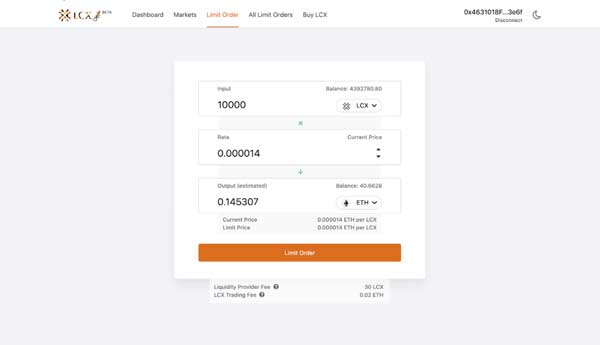
Now enter the limit price in the Rate section. You can see the current price of the token below the output section.
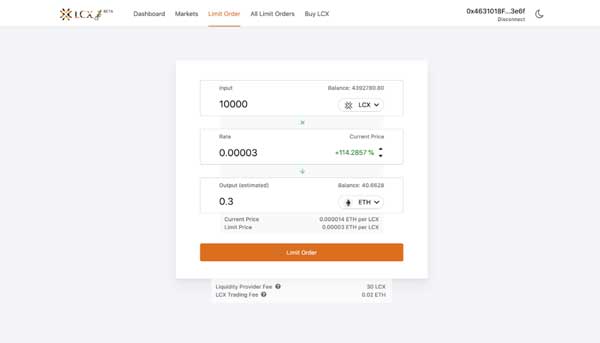
Note on Fees: Only for your successful trade, a fee of 0.3% will be deducted by Uniswap platform for the liquidity platform. Furthermore a fee of 0.02 ETH will be charged by the LCX. You can see the exact amount of fees that will be deducted on the completion of the trade below. 

After clicking Limit Order, the user has to approve the transaction in metamask.

Now click on the Limit Order tab to place the order. 
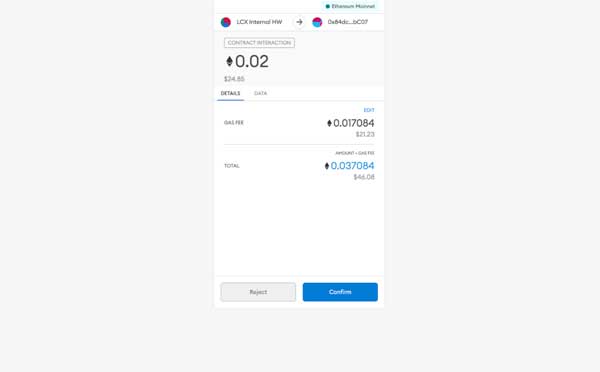
A new window will open with the Transaction Details. A pop up message will appear confirming the placement of your Limit Order.
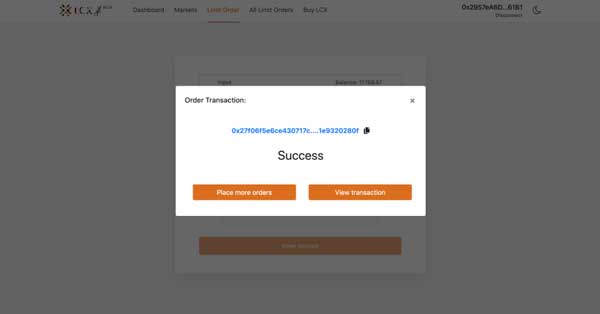
Click on the All Limit Orders tab to view all the trades. Under the Open Trades section, you’ll see a list of all the trades that are still pending, and under the Trade History section, you’ll see a list of all the closed and canceled trades.
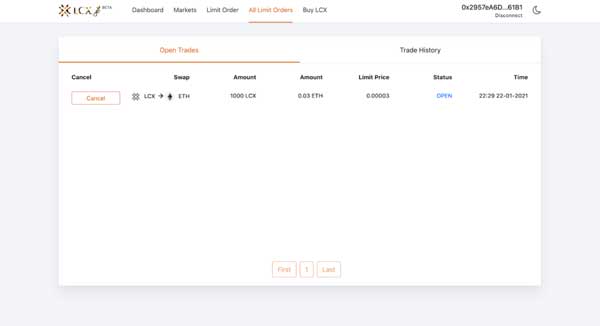
If you intend to cancel a limit order then open the Open Trades section under All Limit Orders and go to the limit order you need to cancel.

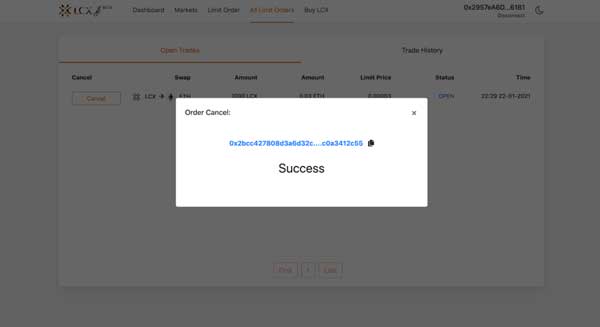
Click on cancel tab next to the limit order. A pop-up message will appear confirming the cancelation and the limit order will be moved to the Trade History section.
LCX DeFi Terminal is a trading dashboard built on top of Uniswap Decentralized Exchange (DEX). Get started at DeFi.LCX.com

Live

Fai trading su LCX

L'exchange crypto orientato alla compliance in Europa, costruito per i professionisti.

  • ✓Sicurezza di livello istituzionale
  • ✓Tokenizzazione di asset reali
Inizia a fare trading
Altro da Insights
Announcements
Building American DeFi: MasterDEX Acquired by LCX
July 15, 2026
Announcements
The Next Chapter Is Here – LCX Liberty. American DeFi.
July 13, 2026
Learning Center
Decentralized Identity (SSI) 101: The End of Passwords and Centralized Logins?
July 6, 2026
Learning Center
What Is a Crypto Market Cycle? Bull and Bear Phases Explained
July 3, 2026
Learning Center
What Are Maker and Taker Fees?
June 29, 2026
LCX
Chiedi all'AI di LCX
ChatGPTClaudePerplexity

Ulteriori informazioni su LCX

  • Chi siamo
  • Carriere
  • Ci contatti
  • Approfondimenti
  • Crypto Prices
  • Catena della libertà
  • Programma bug bounty LCX

Prodotti

  • Gettone LCX
  • LCX Earn
  • Richiedi quotazione
  • Richiedere la vendita di gettoni
  • Modulo di feedback
  • Complaint Form

Legal

  • Commissioni
  • Documenti
  • Marchio e marchi registrati
  • politica sulla riservatezza
  • Termini di servizio
  • Licenze e impronte
  • MiCA Docs
  • Avvertenza sui rischi dei cripto-asset
  • Fiducia e Trasparenza

Guide all'acquisto

  • Compra BTC
  • Compra ETH
  • Compra XRP
  • Compra SOL
  • Compra ADA
  • All Buying Guides >>
  • Crypto Prices >>

Supporto

  • Domande frequenti e supporto
  • Centro di assistenza

Contatto

hello@lcx.com

LCX AG
Herrengasse 6
9490 Vaduz
Liechtenstein

Commercio con LCX

Scansione per scaricare l'applicazione LCX

LCX AG, Herrengasse 6, 9490 Vaduz, Liechtenstein, commercial register FL-0002.580.678-2. LCX AG has applied for authorisation as a crypto-asset service provider under MiCA (EU 2023/1114); the application is under review by the Financial Market Authority (FMA) Liechtenstein. LCX AG is not currently authorised under MiCA. LCX does not offer crypto-asset services to persons in the EEA pending authorisation; existing EEA clients are limited to withdrawals during the wind-down (see MiCA Notice). Crypto-assets involve significant risks, including total loss. LCX does not provide services to persons in the United Kingdom or the United States (Avviso sulle giurisdizioni).

LCX AG © 2018 - 2026. All Rights Reserved

Telegram
X (Twitter)
Instagram
LinkedIn
YouTube
Facebook