
LCX Exchange
Αγορά κρυπτονομισμάτωνΑγορέςΔιαπραγμάτευση
Προϊόντα
AI Συναλλαγές
Κάντε συναλλαγές κρύπτο με AI βοηθούς
ΝΕΟ
Tokenization
Πλαίσιο περιουσιακών στοιχείων πραγματικού κόσμου
Liberty Chain
Θεσμικής ποιότητας Tokenization
Πώληση token
Αποκλειστικές προσφορές ψηφιακών περιουσιακών στοιχείων
Κόμβος ανταμοιβής
Κερδίστε ψηφιακά κίνητρα
Γιατί LCX;
Πληροφορίες
Η αξιόπιστη πύλη κρυπτογράφησης σας
Token LCX
Utility token για απρόσκοπτη διαπραγμάτευση
Συνεργάτες
Δίκτυο αξιόπιστων συνεργατών
Περισσότερα
ΧΑΡΑΚΤΗΡΙΣΤΙΚΑ
VIP
Premium προνόμια για κορυφαίους χρήστες
Έκθεση επιπτώσεων βιωσιμότητας
Μετρήσεις αποτυπώματος άνθρακα με κουπόνια
Συνεργάτης
Συνεργαστείτε και κερδίστε μαζί
Διαγωνισμός συναλλαγών
Διαγωνιστείτε για αποκλειστικά βραβεία
ΠΡΟΣΦΟΡΕΣ
Σύσταση
Invite others to LCX
Πληροφορίες token
Λεπτομέρειες, τιμή & χρησιμότητα
Campaigns
Κερδίστε μεγάλα ποσά εβδομαδιαίως!
Αναλύσεις
Νέα και ανακοινώσεις
ΠΟΡΟΙ
Νέα Κρυπτονομισμάτων
Market news & analysis
Έγγραφα API
Τεκμηρίωση αναφοράς
Συχνές ερωτήσεις και υποστήριξη
Επίλυση ερωτημάτων με γρήγορο και εύκολο τρόπο
Προγράμματα εκμάθησης
Εκμάθηση βήμα προς βήμα
ΣΥΝΕΡΓΆΤΗΣ DEFI & TOKENIZATION
Toto Finance
Tokenizing Real-World Assets
MasterDEX
Αποκεντρωμένη ανταλλαγή
Σύνδεση
Εγγραφή
vip-icon
VIP Club
Σύνδεση
ΑναλύσειςLearning Center

How to Place Limit Order on Uniswap Using LCX?

από LCX Team · March 5, 2021 · Updated February 6, 2023

LCX DeFi Terminal built on Uniswap V2 allows its users to place Limit Orders on Uniswap without getting involved in complex processes. 

In general LCX DeFi Terminal is free of charge, but we require that you hold at least 10,000 $LCX Token in your connected wallet. More about fees at LCX.

You can place a Limit Order on Uniswap V2 using LCX DeFi Terminal by following these simple steps. 

To begin with the steps:

Go to https://defi.lcx.com/ 
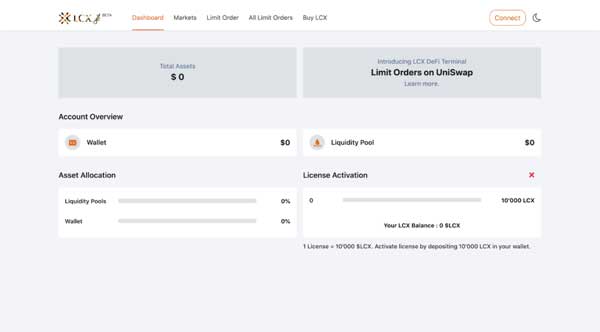
Click on Metamask tab and connect your wallet.
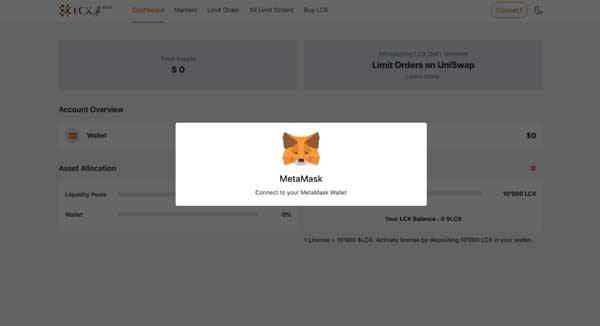
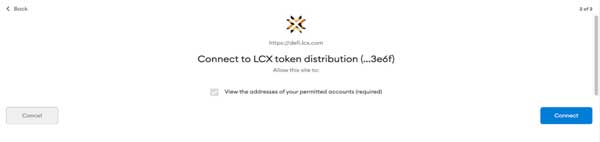
Accept the request to connect your Metamask wallet.
Once it’s connected, the wallet address will appear on the top right corner.

To place a Limit Order, click on the Limit Order Tab on the top of the screen.
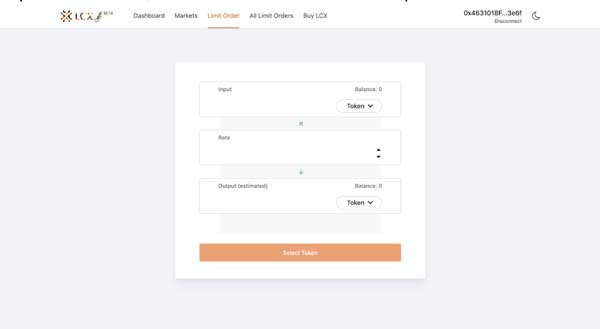
Now select the pair by clicking on the drop-down menu in the Input and Output sections. The token selected in the Input section will be converted for the token in the Output section.
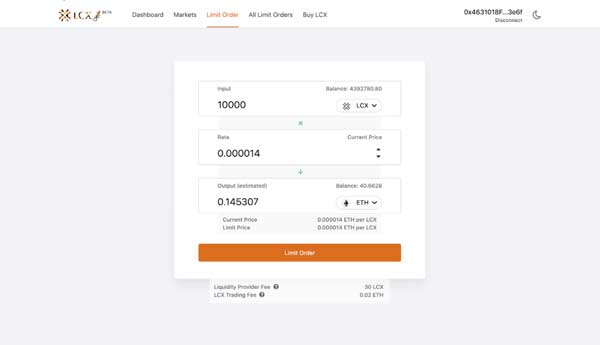
Now enter the limit price in the Rate section. You can see the current price of the token below the output section.
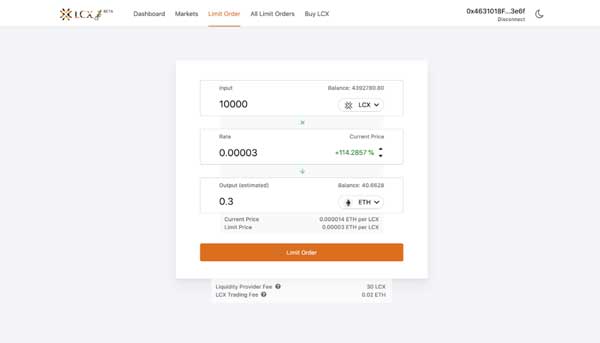
Note on Fees: Only for your successful trade, a fee of 0.3% will be deducted by Uniswap platform for the liquidity platform. Furthermore a fee of 0.02 ETH will be charged by the LCX. You can see the exact amount of fees that will be deducted on the completion of the trade below. 

After clicking Limit Order, the user has to approve the transaction in metamask.

Now click on the Limit Order tab to place the order. 
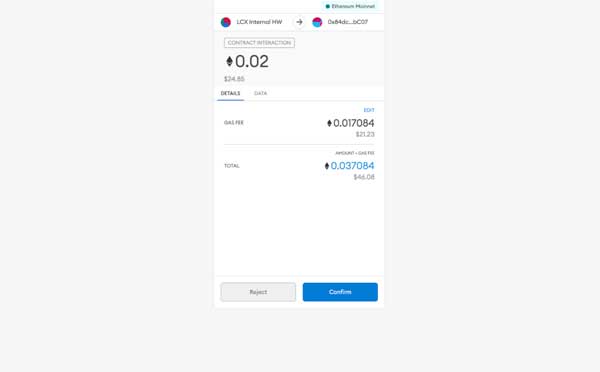
A new window will open with the Transaction Details. A pop up message will appear confirming the placement of your Limit Order.
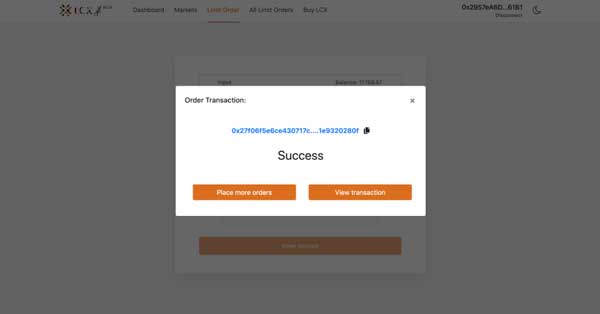
Click on the All Limit Orders tab to view all the trades. Under the Open Trades section, you’ll see a list of all the trades that are still pending, and under the Trade History section, you’ll see a list of all the closed and canceled trades.
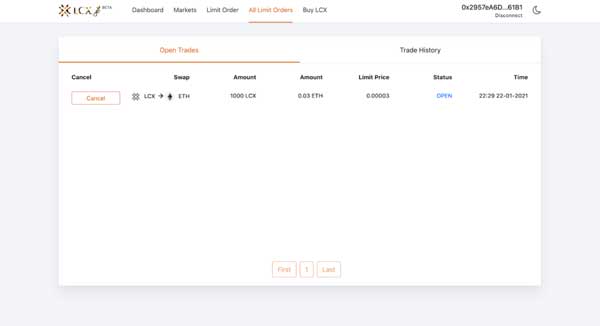
If you intend to cancel a limit order then open the Open Trades section under All Limit Orders and go to the limit order you need to cancel.

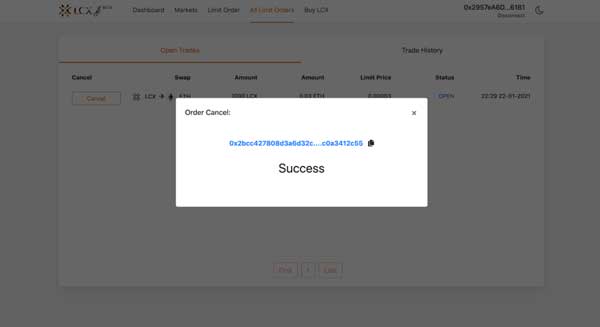
Click on cancel tab next to the limit order. A pop-up message will appear confirming the cancelation and the limit order will be moved to the Trade History section.
LCX DeFi Terminal is a trading dashboard built on top of Uniswap Decentralized Exchange (DEX). Get started at DeFi.LCX.com

Live

Αγοραπωλησία στο LCX

Το crypto exchange της Ευρώπης με προτεραιότητα τη συμμόρφωση, σχεδιασμένο για επαγγελματίες.

  • ✓Ρυθμισμένο από την FMA του Λιχτενστάιν
  • ✓Θεσμικού επιπέδου ασφάλεια
  • ✓Τοκενοποίηση πραγματικών περιουσιακών στοιχείων
Ξεκινήστε τις συναλλαγές
Περισσότερα από Insights
Announcements
Coinbase Supports LCX Token Upgrade
June 23, 2026
Learning Center
What Is the Global Crypto Market Cap?
June 23, 2026
Learning Center
What Is Two-Factor Authentication (2FA) in Crypto?
June 18, 2026
Learning Center
What Is Tokenomics? Supply, Vesting, and Emission Schedules Explained
June 15, 2026
Learning Center
What Is a Block Explorer? How to Read On-Chain Data
June 11, 2026
LCX
Ρωτήστε το AI για το LCX
ChatGPTClaudePerplexity

Περισσότερα για την LCX

  • Σχετικά με εμάς
  • Θέσεις εργασίας
  • Επικοινωνήστε μαζί μας
  • Αναλύσεις
  • Crypto Prices
  • Αλυσίδα Liberty
  • Πρόγραμμα Bug Bounty LCX

Προϊόντα

  • Token LCX
  • LCX Κερδίστε
  • Αίτηση εισαγωγής
  • Υποβολή αίτησης για πώληση Token
  • Φόρμα ανατροφοδότησης
  • Complaint Form

Νομικά

  • Χρεώσεις
  • Έγγραφα
  • Επωνυμία και εμπορικά σήματα
  • Πολιτική απορρήτου
  • Όροι χρήσης
  • Άδειες χρήσης & αποτύπωμα
  • MiCA Docs
  • Προειδοποίηση κινδύνου κρυπτοστοιχείων
  • Εμπιστοσύνη & Διαφάνεια

Οδηγοί αγοράς

  • Αγορά BTC
  • Αγορά ETH
  • Αγορά XRP
  • Αγορά SOL
  • Αγορά ADA
  • All Buying Guides >>
  • Crypto Prices >>

Υποστήριξη

  • Συνήθεις ερωτήσεις και υποστήριξη
  • Κέντρο υποστήριξης

Επικοινωνία

hello@lcx.com

LCX AG
Herrengasse 6
9490 Vaduz
Liechtenstein

Εκτελέστε συναλλαγές με την LCX

Σαρώστε για να κατεβάσετε την εφαρμογή LCX

FMA Liechtenstein

Registered Trusted Technology Service Provider Number: 288159

Η LCX AG, που ιδρύθηκε το 2018, είναι εγγεγραμμένη εταιρεία στο Πριγκιπάτο του Λιχτενστάιν με αριθμό μητρώου FL-0002.580.678-2. Η LCX AG εποπτεύεται από την Αρχή Χρηματοπιστωτικών Αγορών του Λιχτενστάιν με αριθμό μητρώου 288159 ως αξιόπιστος πάροχος τεχνολογικών υπηρεσιών. Η διαπραγμάτευση ψηφιακών περιουσιακών στοιχείων, όπως το Bitcoin, ενέχει σημαντικούς κινδύνους. Η LCX δεν παρέχει υπηρεσίες σε πρόσωπα στο Ηνωμένο Βασίλειο ή στις Ηνωμένες Πολιτείες και αυτός ο ιστότοπος δεν απευθύνεται σε πρόσωπα του Ηνωμένου Βασιλείου ή των ΗΠΑ (Ειδοποίηση περί δικαιοδοσιών).

LCX AG © 2018 - 2026. All Rights Reserved

Telegram
X (Twitter)
Instagram
LinkedIn
YouTube
Facebook