
LCX Exchange
Acheter des cryptoMarchésNégocier
Produits
Trading IA
Tradez des cryptos avec des assistants IA
NOUVEAU
Tokenisation
Cadre des actifs du monde réel
Liberty Chain
Tokenisation institutionnelle
Vente de jetons
Offres exclusives d'actifs numériques
Hub de récompenses
Gagnez des primes numériques
Pourquoi LCX ?
À propos
Votre Crypto Gateway de confiance
Jeton LCX
Jeton d'utilité pour des échanges transparents
Partenaires
Réseau de collaborateurs de confiance
Plus
CARACTÉRISTIQUES
VIP
Avantages pour les meilleurs utilisateurs
Rapport sur l'impact en matière de développement durable
Mesures de l'empreinte carbone des tokens
Affilié
Partenaire et profitez ensemble
Concours de trading
Participez à des concours pour gagner des prix exclusifs
PROMOTIONS
Parrainage
Invite others to LCX
Informations sur le jeton
Détails, prix et utilité
Campaigns
Gagnez gros chaque semaine !
Connaissances
Nouvelles et annonces
RESSOURCES
Actualités Crypto
Market news & analysis
Documentation de l'API
Documentation de référence
FAQ et assistance
Résoudre les requêtes de manière simple et rapide
Tutoriels
Apprendre étape par étape
PARTENAIRE DEFI & TOKENIZATION
Toto Finance
Tokenizing Real-World Assets
MasterDEX
Bourse décentralisée
Se connecter
S'inscrire
vip-icon
Club VIP
Se connecter
ConnaissancesLearning Center

How to Place Limit Order on Uniswap Using LCX?

par LCX Team · March 5, 2021 · Updated February 6, 2023

LCX DeFi Terminal built on Uniswap V2 allows its users to place Limit Orders on Uniswap without getting involved in complex processes. 

In general LCX DeFi Terminal is free of charge, but we require that you hold at least 10,000 $LCX Token in your connected wallet. More about fees at LCX.

You can place a Limit Order on Uniswap V2 using LCX DeFi Terminal by following these simple steps. 

To begin with the steps:

Go to https://defi.lcx.com/ 
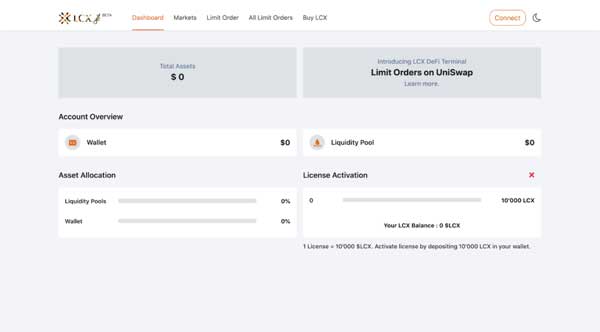
Click on Metamask tab and connect your wallet.
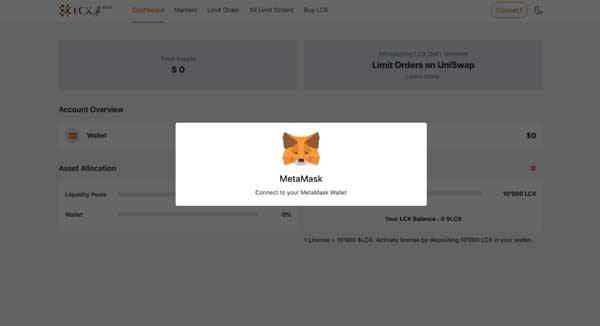
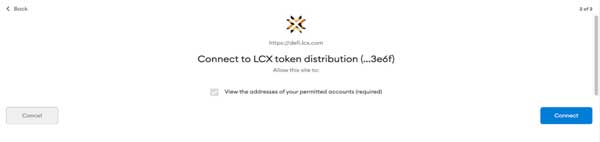
Accept the request to connect your Metamask wallet.
Once it’s connected, the wallet address will appear on the top right corner.

To place a Limit Order, click on the Limit Order Tab on the top of the screen.
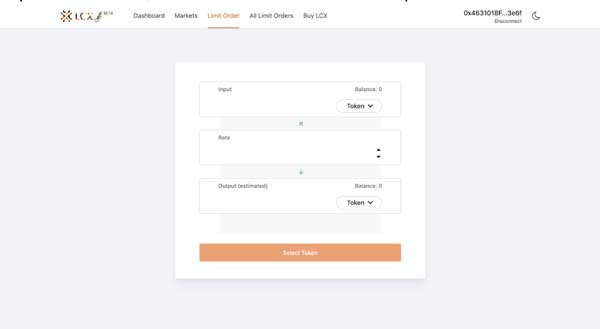
Now select the pair by clicking on the drop-down menu in the Input and Output sections. The token selected in the Input section will be converted for the token in the Output section.
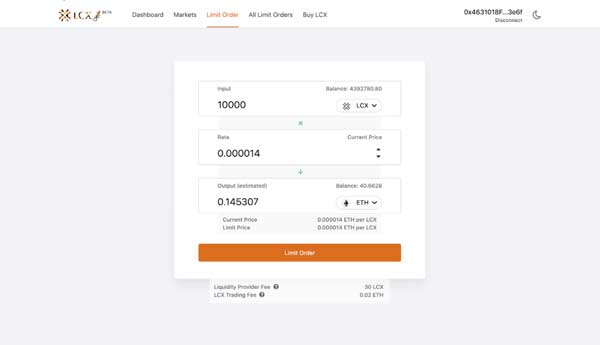
Now enter the limit price in the Rate section. You can see the current price of the token below the output section.
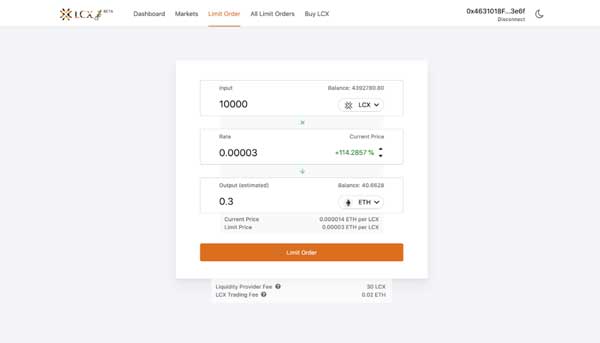
Note on Fees: Only for your successful trade, a fee of 0.3% will be deducted by Uniswap platform for the liquidity platform. Furthermore a fee of 0.02 ETH will be charged by the LCX. You can see the exact amount of fees that will be deducted on the completion of the trade below. 

After clicking Limit Order, the user has to approve the transaction in metamask.

Now click on the Limit Order tab to place the order. 
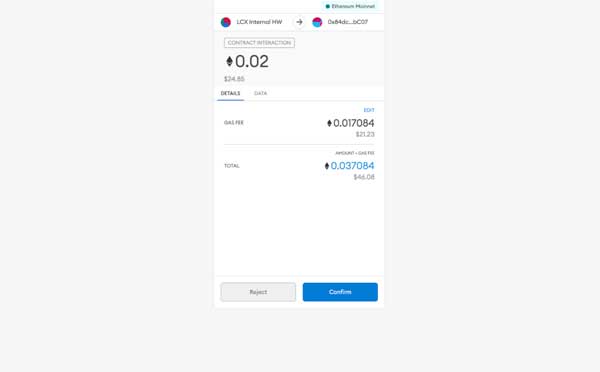
A new window will open with the Transaction Details. A pop up message will appear confirming the placement of your Limit Order.
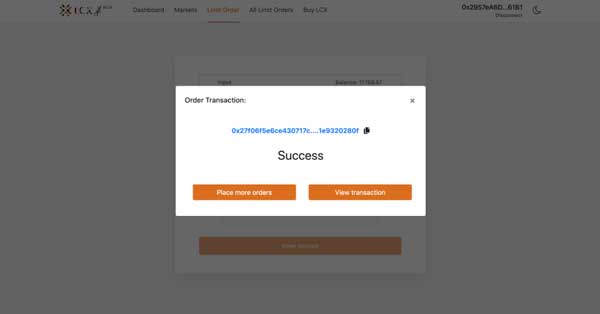
Click on the All Limit Orders tab to view all the trades. Under the Open Trades section, you’ll see a list of all the trades that are still pending, and under the Trade History section, you’ll see a list of all the closed and canceled trades.
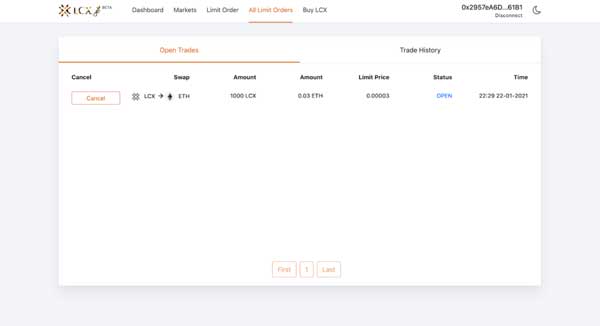
If you intend to cancel a limit order then open the Open Trades section under All Limit Orders and go to the limit order you need to cancel.

Click on cancel tab next to the limit order. A pop-up message will appear confirming the cancelation and the limit order will be moved to the Trade History section.
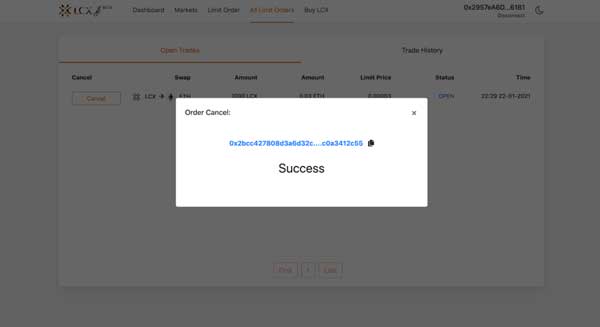
LCX DeFi Terminal is a trading dashboard built on top of Uniswap Decentralized Exchange (DEX). Get started at DeFi.LCX.com

Live

Trader sur LCX

La plateforme crypto axée sur la conformité en Europe, conçue pour les professionnels.

  • ✓Réglementé par la FMA du Liechtenstein
  • ✓Sécurité de niveau institutionnel
  • ✓Tokenisation d'actifs réels
Commencer à trader
Plus de Insights
Announcements
Coinbase Supports LCX Token Upgrade
June 23, 2026
Learning Center
What Is the Global Crypto Market Cap?
June 23, 2026
Learning Center
What Is Two-Factor Authentication (2FA) in Crypto?
June 18, 2026
Learning Center
What Is Tokenomics? Supply, Vesting, and Emission Schedules Explained
June 15, 2026
Learning Center
What Is a Block Explorer? How to Read On-Chain Data
June 11, 2026
LCX
Demandez à l'IA à propos de LCX
ChatGPTClaudePerplexity

Plus d'informations sur LCX

  • A propos de LCX
  • Carrières
  • Contactez nous
  • Connaissances
  • Crypto Prices
  • Chaîne de la liberté
  • Programme de bug bounty LCX

Produits

  • Jeton LCX
  • LCX Earn
  • Demander une cotation
  • Demande de vente de tokens
  • Formulaire de retour d'information
  • Complaint Form

Légal

  • Frais
  • Documents
  • Marque et marques déposées
  • politique de confidentialité
  • Conditions d'utilisation
  • Licences et mentions légales
  • MiCA Docs
  • Avertissement sur les risques liés aux crypto-actifs
  • Confiance et Transparence

Guides d'achat

  • Achat BTC
  • Achat ETH
  • Achat XRP
  • Achat SOL
  • Achat ADA
  • All Buying Guides >>
  • Crypto Prices >>

Soutien

  • FAQ et assistance
  • Centre d'assistance

Contact

hello@lcx.com

LCX AG
Herrengasse 6
9490 Vaduz
Liechtenstein

Négocier avec LCX

Scanner pour télécharger l'application LCX

FMA Liechtenstein

Registered Trusted Technology Service Provider Number: 288159

LCX AG, fondée en 2018, est une société enregistrée dans la Principauté du Liechtenstein sous le numéro d'enregistrement FL-0002.580.678-2. LCX AG est réglementée par l'Autorité des marchés financiers du Liechtenstein sous le numéro d'enregistrement 288159 en tant que fournisseur de services technologiques de confiance. Le trading d'actifs numériques tels que Bitcoin comporte des risques importants. LCX ne fournit pas de services aux personnes situées au Royaume-Uni ou aux États-Unis, et ce site web ne s'adresse pas aux personnes britanniques ou américaines (Avis de juridiction).

LCX AG © 2018 - 2026. All Rights Reserved

Telegram
X (Twitter)
Instagram
LinkedIn
YouTube
Facebook