Pitchfork Indicator in TradingView
通过 LCX Team ·
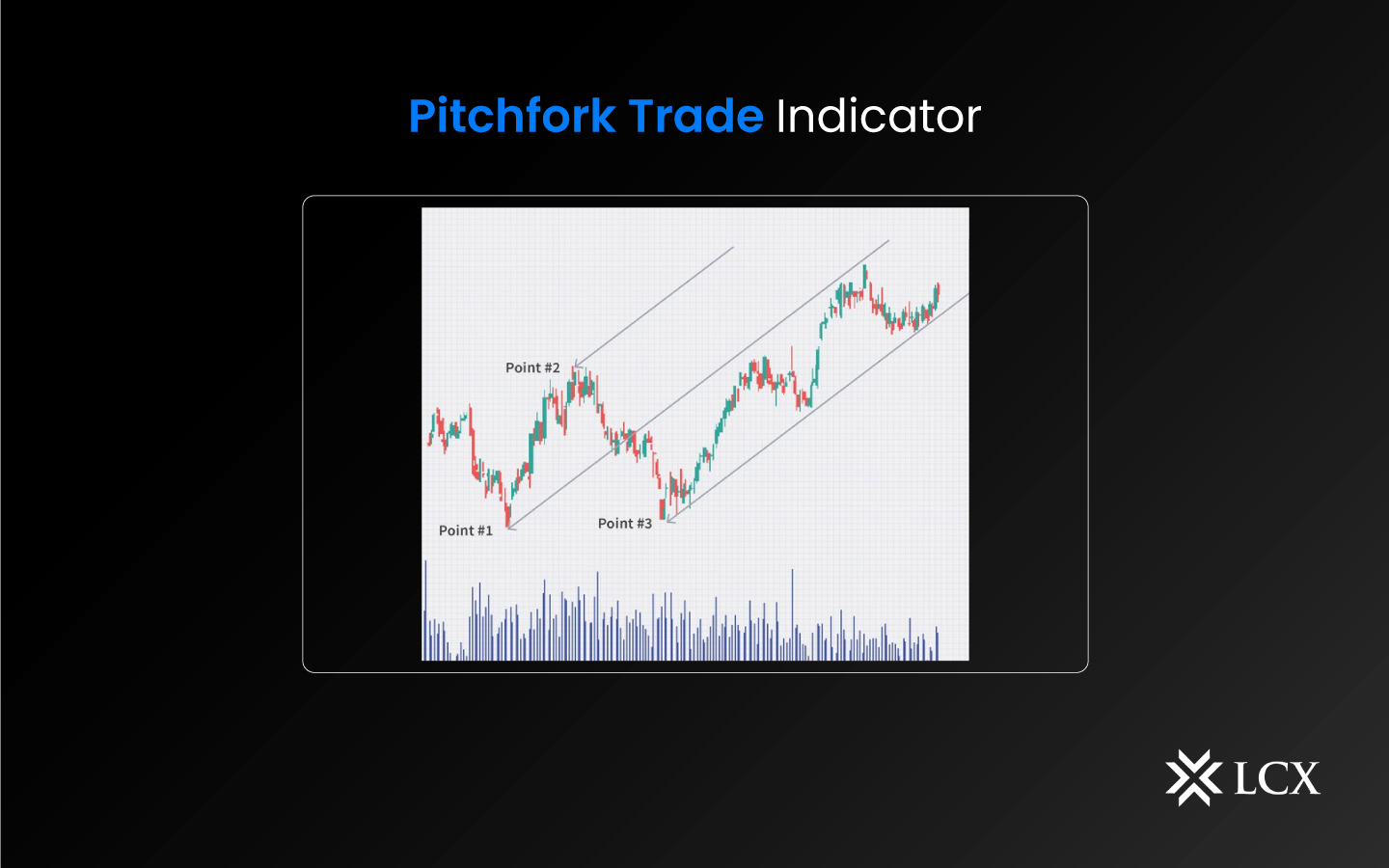
A pitchfork indicator is a technical analysis tool that uses three parallel lines to identify trends and potential turning points in the market. The three lines represent the median line, upper line, and lower line, each of which is drawn using specific calculations. The median line is a trend line that represents the current trend, while the upper and lower lines are used to identify potential reversal points.
To utilize the pitchfork indicator, first draw a trend line connecting two extreme points to form a pitchfork. Depending on the analyst’s preferred pitchfork location, a third point is then set either above or below the second point. Note that two additional sets of lines must be drawn in order to use the pitchfork’s default settings. Up to nine sets of lines can be added in TradingView. The user can save this setup as a template and use it again if more lines are added.
The fundamental concept behind using a pitchfork is that it effectively creates a trend channel. A trend is considered active as long as the price stays within the pitchfork channel. When prices exit a pitchfork channel, reversals happen.

How to use the Pitchfork Indicator in TradingView at LCX Exchange?
Using pitchfork indicators in TradingView at LCX is simple and straightforward. Here are the steps to follow:
- Select a chart: Choose the chart you want to analyze and select the instrument you are interested in trading.
- Add the Pitchfork Indicator: To add the pitchfork indicator to your chart, click on the “Indicators” button on the chart’s toolbar, select “Pitchfork”, and then select the desired settings.
- Customize the indicator: Customize the indicator to your preferred settings by adjusting the parameters, such as the length of the median line, the number of pivots, and the color of the lines.
- Interpret the indicator: Once the indicator is added to your chart, you can interpret the results to make informed trading decisions. For example, if the price is trending upwards and approaching the upper line, this may indicate a potential sell signal, while if the price is trending downwards and approaching the lower line, this may indicate a potential buy signal.
In Conclusion
In conclusion, pitchfork indicators are a powerful tool for technical traders to analyze chart patterns and make informed trading decisions. TradingView offers a variety of pitchfork indicators to help traders enhance their trading strategies. Following the steps outlined in this guide, you can effectively use pitchfork indicators in TradingView to improve your trading results.