
LCX Exchange
Kup kryptowalutyRynkiHandluj
Produkty
AI Trading
Handluj kryptowalutami z asystentami AI
NEW
Tokenizacja
Struktura aktywów w świecie rzeczywistym
Liberty Chain
Tokenizacja klasy instytucjonalnej
Sprzedaż tokenów
Odkryj nowe premiery tokenów
Centrum nagród
Zarabianie cyfrowych zachęt
Dlaczego LCX?
Info o
Państwa zaufana brama kryptowalutowa
Token LCX
Token użytkowy do płynnego handlu
Partnerzy
Sieć zaufanych współpracowników
Więcej
FUNKCJE
VIP
Korzyści premium dla najlepszych użytkowników
Raport dotyczący wpływu na zrównoważony rozwój
Wskaźniki śladu węglowego tokenów
Partner
Partner i wspólny zysk
Konkurs handlowy
Rywalizuj o ekskluzywne nagrody
PROMOCJE
Polecenie
Poleć znajomych do LCX
Informacje o tokenie
Szczegóły, cena i użyteczność
Campaigns
Aktualne promocje i wydarzenia
Wnioski
Aktualności i ogłoszenia
ZASOBY
Wiadomości Krypto
Market news & analysis
Dokumentacja API
Dokumentacja referencyjna
FAQ i wsparcie
Rozwiązuj zapytania szybko i łatwo
Samouczki
Ucz się krok po kroku
PARTNER W ZAKRESIE DEFI I TOKENIZACJI
Toto Finance
Tokenizing Real-World Assets
MasterDEX
Zdecentralizowana giełda
Zaloguj się
Zapisz się
vip-icon
Klub VIP
Zaloguj się
WnioskiLearning Center

How to Place Limit Order on Uniswap Using LCX?

przez LCX Team · March 5, 2021 · Updated February 6, 2023

LCX DeFi Terminal built on Uniswap V2 allows its users to place Limit Orders on Uniswap without getting involved in complex processes. 

In general LCX DeFi Terminal is free of charge, but we require that you hold at least 10,000 $LCX Token in your connected wallet. More about fees at LCX.

You can place a Limit Order on Uniswap V2 using LCX DeFi Terminal by following these simple steps. 

To begin with the steps:

Go to https://defi.lcx.com/ 
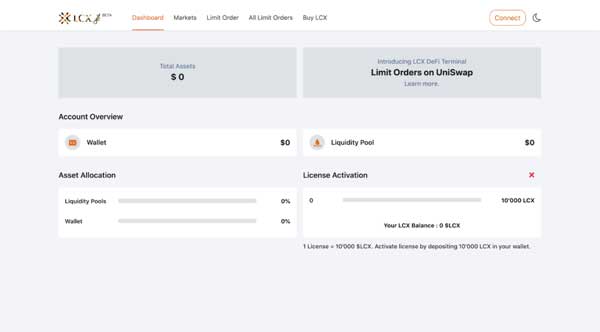
Click on Metamask tab and connect your wallet.
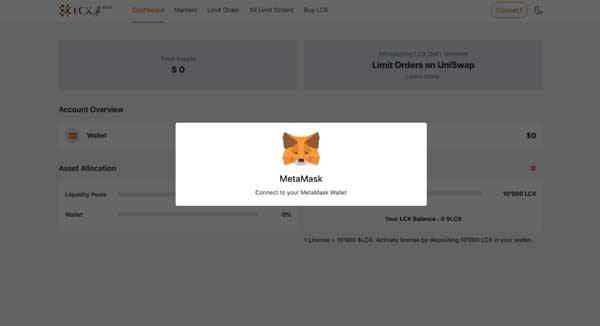
Accept the request to connect your Metamask wallet.
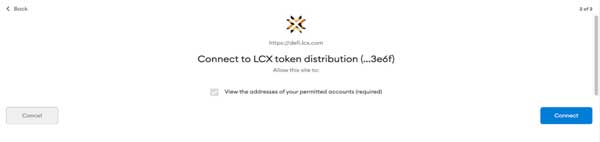
Once it’s connected, the wallet address will appear on the top right corner.

To place a Limit Order, click on the Limit Order Tab on the top of the screen.
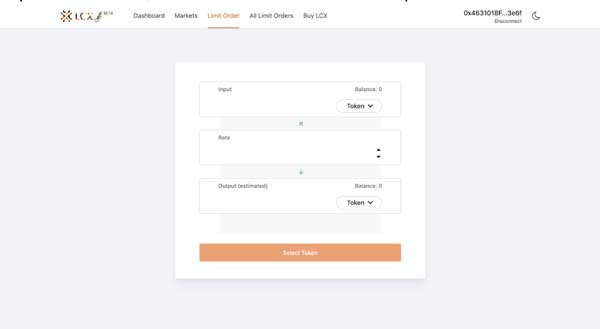
Now select the pair by clicking on the drop-down menu in the Input and Output sections. The token selected in the Input section will be converted for the token in the Output section.
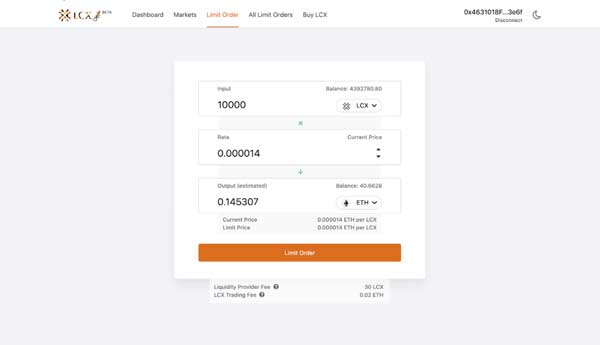
Now enter the limit price in the Rate section. You can see the current price of the token below the output section.
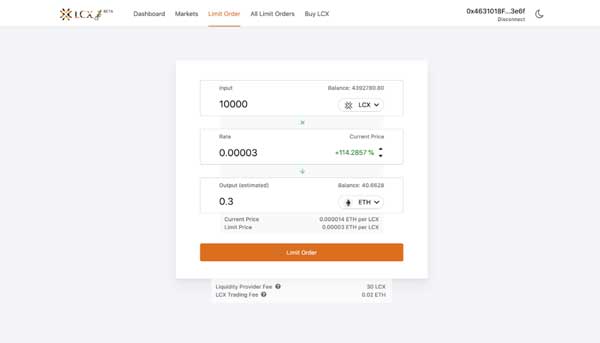
Note on Fees: Only for your successful trade, a fee of 0.3% will be deducted by Uniswap platform for the liquidity platform. Furthermore a fee of 0.02 ETH will be charged by the LCX. You can see the exact amount of fees that will be deducted on the completion of the trade below. 

After clicking Limit Order, the user has to approve the transaction in metamask.

Now click on the Limit Order tab to place the order. 
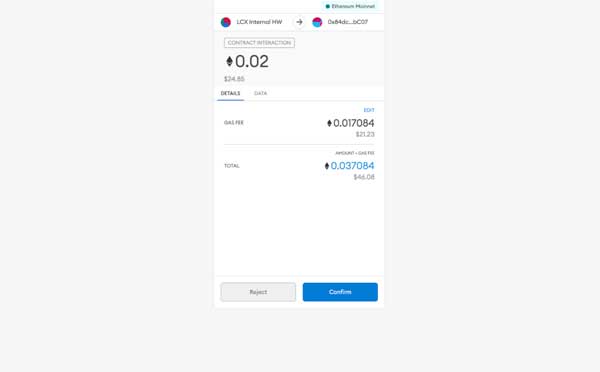
A new window will open with the Transaction Details. A pop up message will appear confirming the placement of your Limit Order.
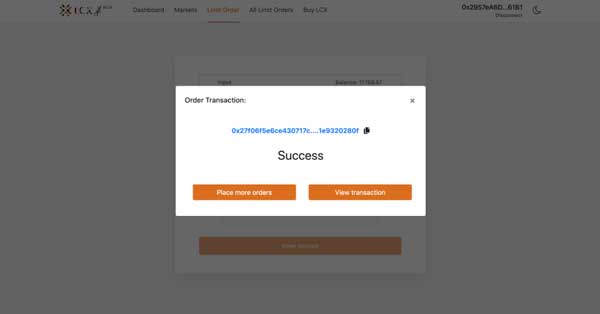
Click on the All Limit Orders tab to view all the trades. Under the Open Trades section, you’ll see a list of all the trades that are still pending, and under the Trade History section, you’ll see a list of all the closed and canceled trades.
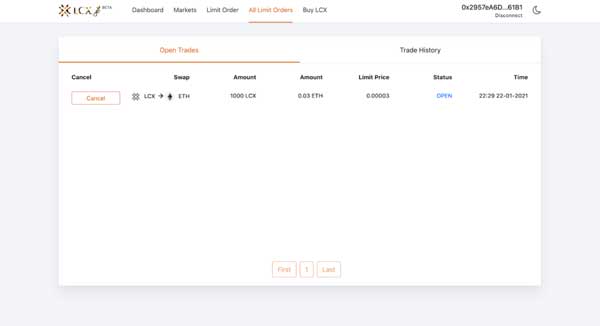
If you intend to cancel a limit order then open the Open Trades section under All Limit Orders and go to the limit order you need to cancel.

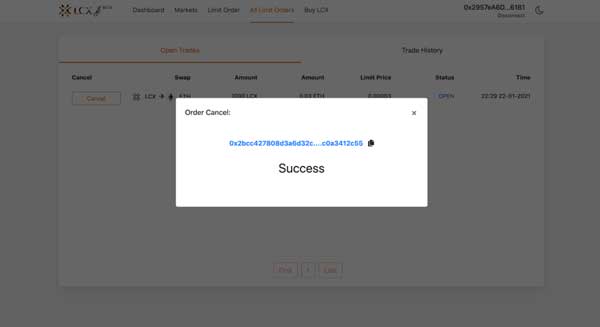
Click on cancel tab next to the limit order. A pop-up message will appear confirming the cancelation and the limit order will be moved to the Trade History section.
LCX DeFi Terminal is a trading dashboard built on top of Uniswap Decentralized Exchange (DEX). Get started at DeFi.LCX.com

Live

Handluj na LCX

Europejska giełda kryptowalut stawiająca na zgodność z przepisami, stworzona dla profesjonalistów.

  • ✓Bezpieczeństwo klasy instytucjonalnej
  • ✓Tokenizacja aktywów rzeczywistych
Zacznij handlować
Więcej z Insights
Announcements
Building American DeFi: MasterDEX Acquired by LCX
July 15, 2026
Announcements
The Next Chapter Is Here – LCX Liberty. American DeFi.
July 13, 2026
Learning Center
Decentralized Identity (SSI) 101: The End of Passwords and Centralized Logins?
July 6, 2026
Learning Center
What Is a Crypto Market Cycle? Bull and Bear Phases Explained
July 3, 2026
Learning Center
What Are Maker and Taker Fees?
June 29, 2026
LCX
Zapytaj AI o LCX
ChatGPTClaudePerplexity

Więcej informacji o LCX

  • O nas
  • Kariera
  • Proszę się z nami skontaktować
  • Wnioski
  • Crypto Prices
  • Łańcuch wolności
  • Program nagród LCX

Produkty

  • Token LCX
  • LCX Earn
  • Aplikuj o notowanie
  • Proszę złożyć wniosek o sprzedaż tokena
  • Formularz opinii
  • Complaint Form

Aspekty prawne

  • Opłaty
  • Dokumenty
  • Marka i znaki towarowe
  • Polityka prywatności
  • Warunki korzystania z usługi
  • Licencje i znak towarowy
  • MiCA Docs
  • Ostrzeżenie o ryzyku związanym z kryptoaktywami
  • Zaufanie i Przejrzystość

Przewodniki zakupowe

  • Kup BTC
  • Kup ETH
  • Kup XRP
  • Kup SOL
  • Kup ADA
  • All Buying Guides >>
  • Crypto Prices >>

Wsparcie

  • FAQ i wsparcie
  • Centrum wsparcia

Kontakt

hello@lcx.com

LCX AG
Herrengasse 6
9490 Vaduz
Liechtenstein

Handel z LCX

Skanowanie w celu pobrania aplikacji LCX

LCX AG, Herrengasse 6, 9490 Vaduz, Liechtenstein, commercial register FL-0002.580.678-2. LCX AG has applied for authorisation as a crypto-asset service provider under MiCA (EU 2023/1114); the application is under review by the Financial Market Authority (FMA) Liechtenstein. LCX AG is not currently authorised under MiCA. LCX does not offer crypto-asset services to persons in the EEA pending authorisation; existing EEA clients are limited to withdrawals during the wind-down (see MiCA Notice). Crypto-assets involve significant risks, including total loss. LCX does not provide services to persons in the United Kingdom or the United States (Informacja o jurysdykcjach).

LCX AG © 2018 - 2026. All Rights Reserved

Telegram
X (Twitter)
Instagram
LinkedIn
YouTube
Facebook