
LCX Exchange
Comprar criptoMercadosNegociação
Produtos
Trading com IA
Negocie cripto com assistentes de IA
NOVO
Tokenização
Estrutura dos activos do mundo real
Liberty Chain
Tokenização institucional
Venda de tokens
Ofertas exclusivas de activos digitais
Centro de recompensas
Ganhe incentivos digitais
Porquê a LCX?
Sobre
O seu portal de criptografia de confiança
Token LCX
Token de utilidade para uma negociação sem problemas
Parceiros
Rede de colaboradores de confiança
Mais
FUNCIONALIDADES
VIP
Vantagens premium para os melhores utilizadores
Relatório de impacto de sustentabilidade
Métricas da pegada de carbono dos tokens
Afiliado
Seja parceiro e lucre em conjunto
Competição de trading
Concorra a prémios exclusivos
PROMOÇÕES
Recomendação
Invite others to LCX
Informações do token
Detalhes, preço e utilidade
Campaigns
Ganhe muito dinheiro semanalmente!
Informações
Notícias e anúncios
RECURSOS
Notícias Crypto
Market news & analysis
Documentos da API
Documentação de referência
Perguntas frequentes e suporte
Resolver consultas de forma rápida e fácil
Tutoriais
Aprender passo a passo
PARCEIRO DEFI & TOKENIZATION
Toto Finance
Tokenizing Real-World Assets
MasterDEX
Bolsa descentralizada
Iniciar sessão
Registar-se
vip-icon
Clube VIP
Iniciar sessão
InformaçõesLearning Center

How to Place Limit Order on Uniswap Using LCX?

por LCX Team · March 5, 2021 · Updated February 6, 2023

LCX DeFi Terminal built on Uniswap V2 allows its users to place Limit Orders on Uniswap without getting involved in complex processes. 

In general LCX DeFi Terminal is free of charge, but we require that you hold at least 10,000 $LCX Token in your connected wallet. More about fees at LCX.

You can place a Limit Order on Uniswap V2 using LCX DeFi Terminal by following these simple steps. 

To begin with the steps:

Go to https://defi.lcx.com/ 
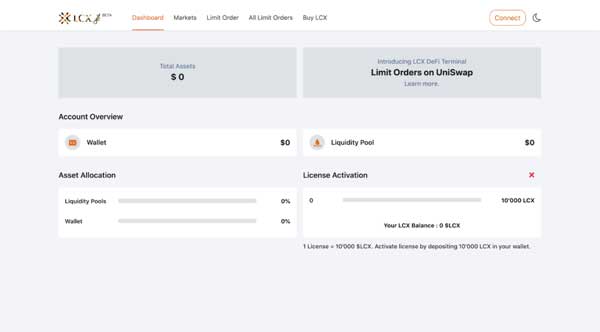
Click on Metamask tab and connect your wallet.
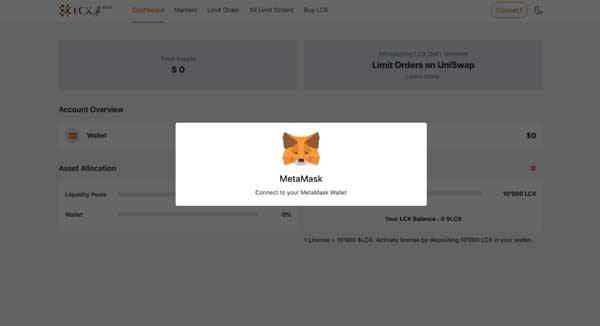
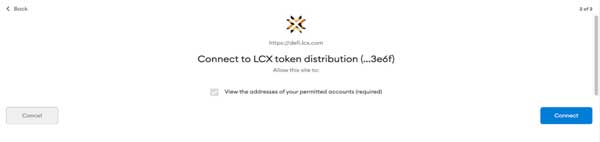
Accept the request to connect your Metamask wallet.
Once it’s connected, the wallet address will appear on the top right corner.

To place a Limit Order, click on the Limit Order Tab on the top of the screen.
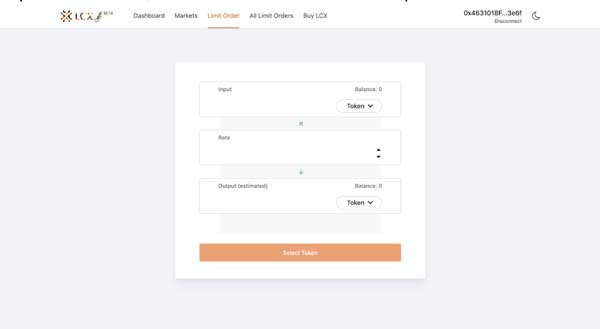
Now select the pair by clicking on the drop-down menu in the Input and Output sections. The token selected in the Input section will be converted for the token in the Output section.
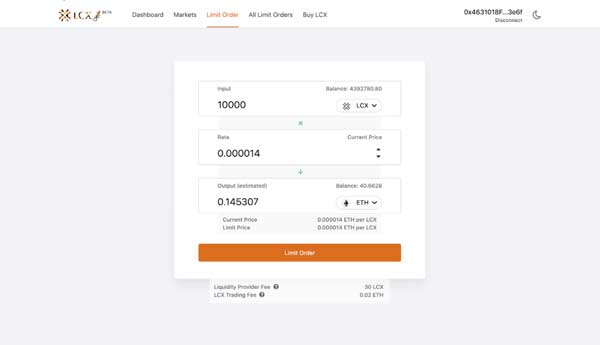
Now enter the limit price in the Rate section. You can see the current price of the token below the output section.
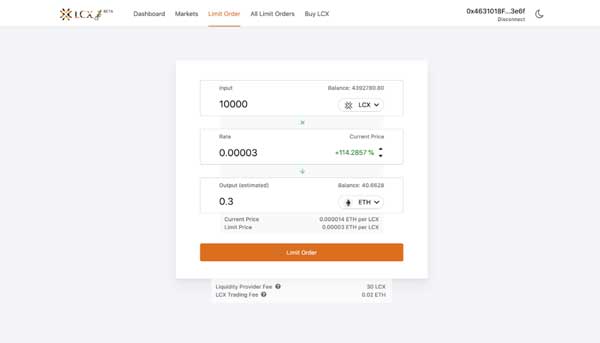
Note on Fees: Only for your successful trade, a fee of 0.3% will be deducted by Uniswap platform for the liquidity platform. Furthermore a fee of 0.02 ETH will be charged by the LCX. You can see the exact amount of fees that will be deducted on the completion of the trade below. 

After clicking Limit Order, the user has to approve the transaction in metamask.

Now click on the Limit Order tab to place the order. 
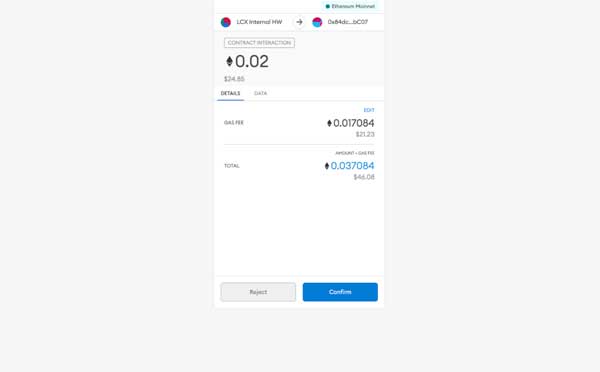
A new window will open with the Transaction Details. A pop up message will appear confirming the placement of your Limit Order.
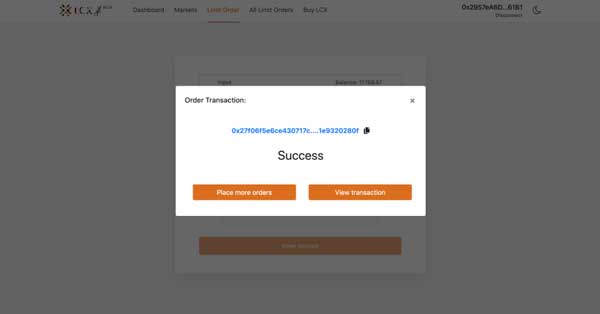
Click on the All Limit Orders tab to view all the trades. Under the Open Trades section, you’ll see a list of all the trades that are still pending, and under the Trade History section, you’ll see a list of all the closed and canceled trades.
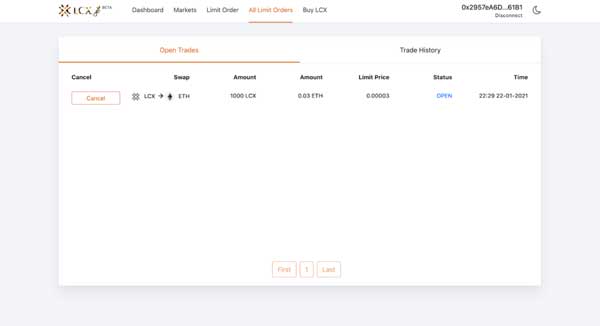
If you intend to cancel a limit order then open the Open Trades section under All Limit Orders and go to the limit order you need to cancel.

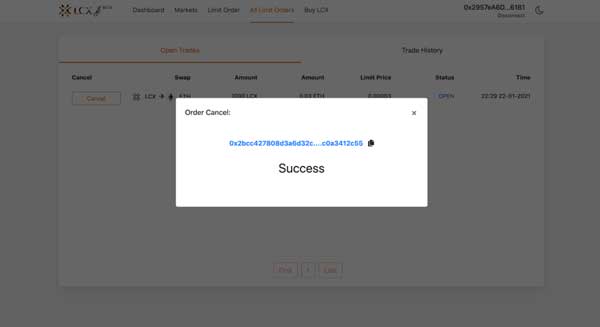
Click on cancel tab next to the limit order. A pop-up message will appear confirming the cancelation and the limit order will be moved to the Trade History section.
LCX DeFi Terminal is a trading dashboard built on top of Uniswap Decentralized Exchange (DEX). Get started at DeFi.LCX.com

Live

Negociar na LCX

A exchange de criptomoedas focada em conformidade da Europa, criada para profissionais.

  • ✓Regulamentado pela FMA de Liechtenstein
  • ✓Segurança de nível institucional
  • ✓Tokenização de ativos do mundo real
Começar a negociar
Mais do Insights
Announcements
Coinbase Supports LCX Token Upgrade
June 23, 2026
Learning Center
What Is the Global Crypto Market Cap?
June 23, 2026
Learning Center
What Is Two-Factor Authentication (2FA) in Crypto?
June 18, 2026
Learning Center
What Is Tokenomics? Supply, Vesting, and Emission Schedules Explained
June 15, 2026
Learning Center
What Is a Block Explorer? How to Read On-Chain Data
June 11, 2026
LCX
Pergunte à IA sobre o LCX
ChatGPTClaudePerplexity

Mais sobre a LCX

  • Sobre nós
  • Carreiras
  • Contacte-nos
  • Informações
  • Crypto Prices
  • Cadeia da liberdade
  • Programa de recompensas LCX

Produtos

  • Token LCX
  • Ganhe com LCX
  • Candidatar-se à listagem
  • Candidate-se à venda de tokens
  • Formulário de feedback
  • Complaint Form

Departamento jurídico

  • Taxas
  • Documentos
  • Marca e marcas comerciais
  • Política de privacidade
  • Termos do serviço
  • Licenças e impressões
  • MiCA Docs
  • Aviso de risco de criptoativos
  • Confiança e Transparência

Guias de compra

  • Comprar BTC
  • Comprar ETH
  • Comprar XRP
  • Comprar SOL
  • Comprar ADA
  • All Buying Guides >>
  • Crypto Prices >>

Apoio

  • Perguntas frequentes e suporte
  • Centro de apoio

Contacto

hello@lcx.com

LCX AG
Herrengasse 6
9490 Vaduz
Liechtenstein

Negocie com a LCX

Digitalizar para descarregar a aplicação LCX

FMA Liechtenstein

Registered Trusted Technology Service Provider Number: 288159

A LCX AG, criada em 2018, é uma empresa registada no Principado do Liechtenstein com o número de registo FL-0002.580.678-2. A LCX AG é regulada pela Autoridade do Mercado Financeiro do Liechtenstein sob o número de registo 288159 como fornecedor de serviços de tecnologia de confiança. A negociação de ativos digitais como a Bitcoin envolve riscos significativos. A LCX não presta serviços a pessoas no Reino Unido ou nos Estados Unidos, e este site não se destina a pessoas do Reino Unido ou dos EUA (Aviso de jurisdição).

LCX AG © 2018 - 2026. All Rights Reserved

Telegram
X (Twitter)
Instagram
LinkedIn
YouTube
Facebook