
LCX Exchange
Buy CryptoMarketsTrade
Products
AI Trading
Trade crypto with AI assistants
NEW
Tokenization
Real World Assets framework
Liberty Chain
Institutional-grade Tokenization
Token Sale
Exclusive digital asset offerings
Reward Hub
Earn digital incentives
Why LCX?
About
Your Trusted Crypto Gateway
LCX Token
Utility token for seamless trading
Partners
Trusted collaborators network
More
FEATURES
VIP
Premium perks for top users
Sustainability Impact Report
Token carbon footprint metrics
Affiliate
Partner and profit together
Trading Competition
Compete for exclusive prizes
PROMOTIONS
Referral
Invite others to LCX
Token Info
Details, price & utility
Campaigns
Win big weekly!
Insights
News and Announcements
RESOURCES
Crypto News
Market news & analysis
API docs
Reference documentation
FAQ & support
Resolve queries quick and easy way
Tutorials
Learn step by step
DEFI & TOKENIZATION PARTNER
Toto Finance
Tokenizing Real-World Assets
MasterDEX
Decentralized exchange
Log in
Sign up
vip-icon
VIP Club
Log in
InsightsLearning Center

How to Place Limit Order on Uniswap Using LCX?

by LCX Team · March 5, 2021 · Updated February 6, 2023

LCX DeFi Terminal built on Uniswap V2 allows its users to place Limit Orders on Uniswap without getting involved in complex processes. 

In general LCX DeFi Terminal is free of charge, but we require that you hold at least 10,000 $LCX Token in your connected wallet. More about fees at LCX.

You can place a Limit Order on Uniswap V2 using LCX DeFi Terminal by following these simple steps. 

To begin with the steps:

Go to https://defi.lcx.com/ 
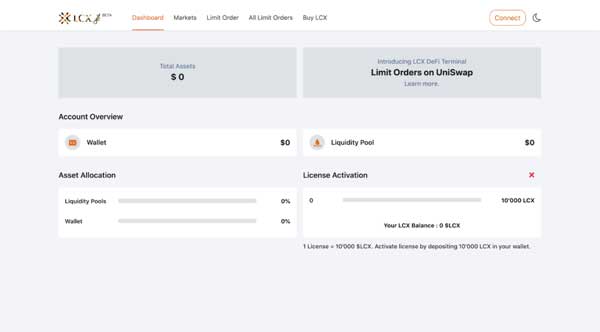
Click on Metamask tab and connect your wallet.
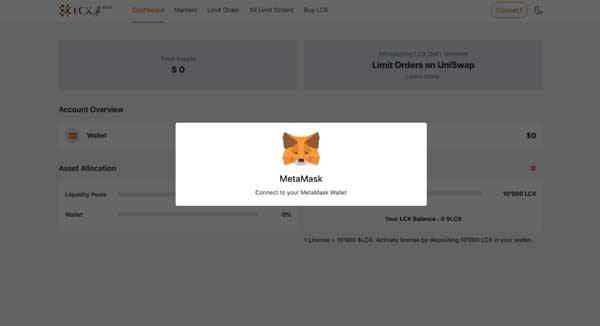
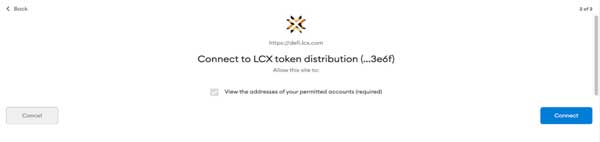
Accept the request to connect your Metamask wallet.
Once it’s connected, the wallet address will appear on the top right corner.

To place a Limit Order, click on the Limit Order Tab on the top of the screen.
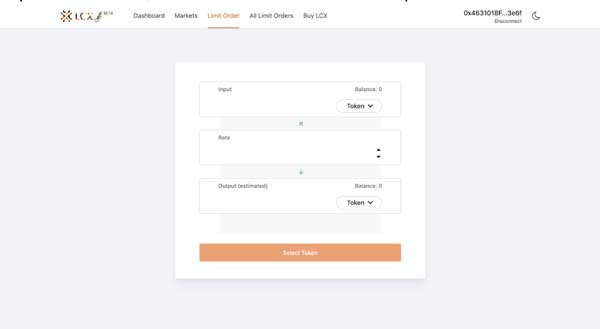
Now select the pair by clicking on the drop-down menu in the Input and Output sections. The token selected in the Input section will be converted for the token in the Output section.
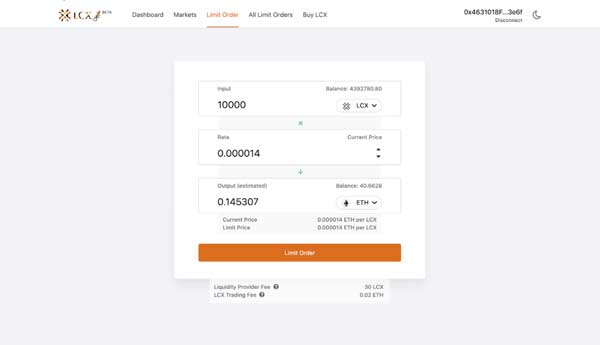
Now enter the limit price in the Rate section. You can see the current price of the token below the output section.
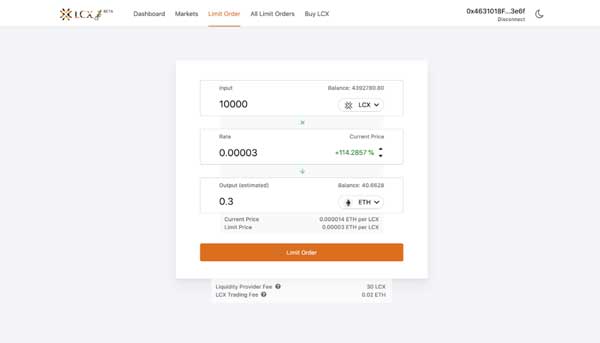
Note on Fees: Only for your successful trade, a fee of 0.3% will be deducted by Uniswap platform for the liquidity platform. Furthermore a fee of 0.02 ETH will be charged by the LCX. You can see the exact amount of fees that will be deducted on the completion of the trade below. 

After clicking Limit Order, the user has to approve the transaction in metamask.

Now click on the Limit Order tab to place the order. 
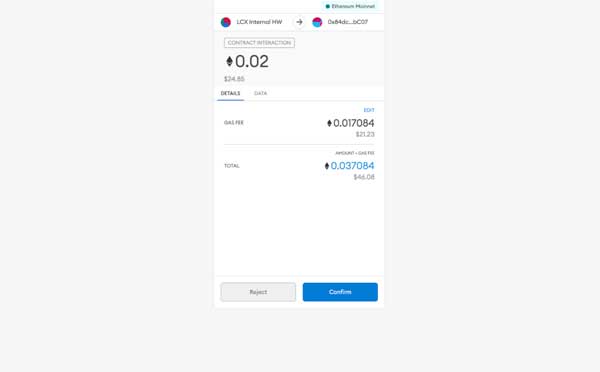
A new window will open with the Transaction Details. A pop up message will appear confirming the placement of your Limit Order.
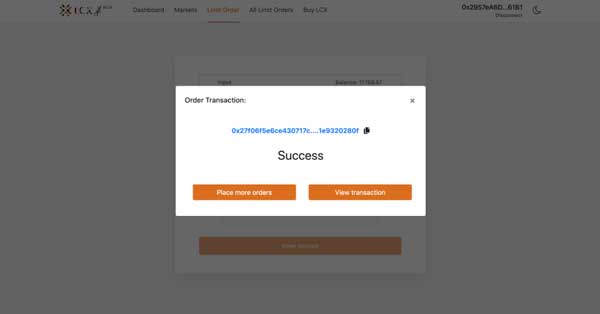
Click on the All Limit Orders tab to view all the trades. Under the Open Trades section, you’ll see a list of all the trades that are still pending, and under the Trade History section, you’ll see a list of all the closed and canceled trades.
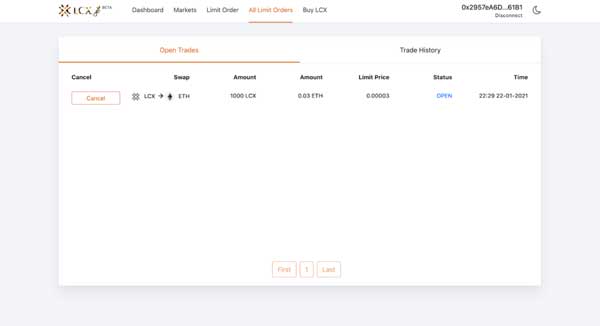
If you intend to cancel a limit order then open the Open Trades section under All Limit Orders and go to the limit order you need to cancel.

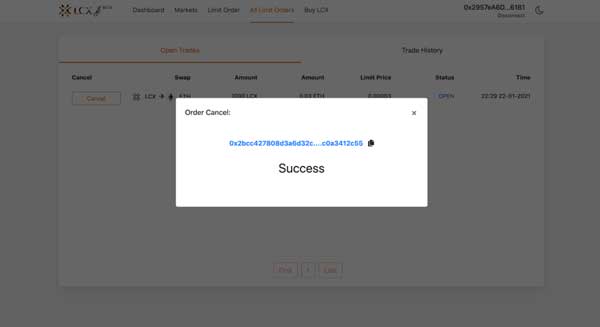
Click on cancel tab next to the limit order. A pop-up message will appear confirming the cancelation and the limit order will be moved to the Trade History section.
LCX DeFi Terminal is a trading dashboard built on top of Uniswap Decentralized Exchange (DEX). Get started at DeFi.LCX.com

Live

Trade on LCX

Europe's compliance-first crypto exchange, built for professionals.

  • ✓Regulated by Liechtenstein FMA
  • ✓Institutional-Grade Security
  • ✓Real-World Asset Tokenization
Start Trading
More from Insights
Announcements
Coinbase Supports LCX Token Upgrade
June 23, 2026
Learning Center
What Is the Global Crypto Market Cap?
June 23, 2026
Learning Center
What Is Two-Factor Authentication (2FA) in Crypto?
June 18, 2026
Learning Center
What Is Tokenomics? Supply, Vesting, and Emission Schedules Explained
June 15, 2026
Learning Center
What Is a Block Explorer? How to Read On-Chain Data
June 11, 2026
LCX
Ask AI about LCX
ChatGPTClaudePerplexity

More About LCX

  • About Us
  • Careers
  • Contact us
  • Insights
  • Crypto Prices
  • Liberty chain
  • LCX Bug Bounty Program

Products

  • LCX Token
  • LCX Earn
  • Apply for Listing
  • Apply for Token Sale
  • Feedback Form
  • Complaint Form

Legal

  • Fees
  • Documents
  • Brand and Trademarks
  • Privacy Policy
  • Terms of Service
  • Licenses & Imprint
  • MiCA Docs
  • Crypto-Asset Risk Warning
  • Trust & Transparency

Buying Guides

  • Buy BTC
  • Buy ETH
  • Buy XRP
  • Buy SOL
  • Buy ADA
  • All Buying Guides >>
  • Crypto Prices >>

Support

  • FAQ & Support
  • Support Centre

Contact

hello@lcx.com

LCX AG
Herrengasse 6
9490 Vaduz
Liechtenstein

Trade with LCX

Scan to download LCX app

FMA Liechtenstein

Registered Trusted Technology Service Provider Number: 288159

LCX AG, established in 2018, is a registered company in the Principality of Liechtenstein with registration number FL-0002.580.678-2. LCX AG is regulated by the Financial Market Authority of Liechtenstein under the registration No. 288159 as a trusted technology service provider. Trading digital assets such as Bitcoin involves significant risks. LCX does not provide services to persons in the United Kingdom or the United States, and this website is not directed at UK or US persons (Jurisdiction Notice).

LCX AG © 2018 - 2026. All Rights Reserved

Telegram
X (Twitter)
Instagram
LinkedIn
YouTube
Facebook